How to Check in
Check-in: 15:00 ~
Check out: until 10:00
Because it's a fully automated self-check-in system, you can check in anytime after 3 PM.
<Not available>
Early check-in
Late check-out

About self check-in
N FIELD HOTEL employs a fully automated self-check-in system. Please check in and check out yourself using the tablet located at the front desk on the first floor.

1
Reservations | Reservations via accommodation booking website
When making a reservation through any of the accommodation booking websites, please be sure to register your email address and mobile phone number correctly.
For guests who have made a reservation, we will send your reservation details and check-in code to the email address you registered (or via the messaging/chat function provided by each accommodation booking site). If you have not registered an email address, we will send it to your mobile phone (SMS).

Before your stay | Pre-check-in registration
Seven days before your stay, we will send you a dedicated My Page URL from our hotel. You can register for check-in in advance on this page, which will simplify the check-in process on the day of your stay.
Prior registration of your dedicated customer page URL is not required. Even last-minute bookings can be made on-site using a tablet on the day of your stay.

2
Check-in on the day of arrival
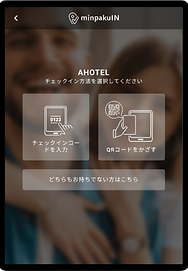
Please check in using the tablet located at the front desk on the first floor of the hotel. Guests who have pre-registered on their customer page can complete check-in by scanning the QR code. Check-in using a check-in code is also available.
Even if you don't know your QR code or check-in code, you can still check in by entering your name, phone number, and other information, which will be verified against your reservation details.
3
Check-in complete | Smart key issued
Please note down the displayed smart key (key number) and enter it into the smart lock installed on the door of your room to unlock it.
The smart key (key number) is valid until 10:00 a.m. on the day of checkout.

4
Enter the room | Enter into the smart lock
Please enter the smart key (key number) into the smart lock.
Press the square button in the middle.
Enter your smart key (key number).
Press 'E' to enter.
The door will unlock.
The door will lock automatically (auto-lock). When you go out, please be sure to write down your smart key (key number) so you don't forget it.
*If you exceed 10:00 AM on the check-out day, your smart key (key number) will automatically become invalid and you will not be able to enter the room.

5